
HSA:Control schemes
From Halopedia, the Halo wiki
![A screenshot of "VIEW CONTROLS" menu from Halo: Spartan Assault (Xbox 360)[1]Note: The screenshot was taken from the emulator Xenia.](/File:HSA_%E2%80%94_ViewControls_Menu_Xbox360_Screenshot.png)
"BEAUTIFUL, AIN'T IT? SOMEONE SHOULD TAKE A PICTURE." It has been requested that image(s) be uploaded and added to this page or section. Remove this template once the image(s) have been uploaded and applied. |

The following control schemes are available for Halo: Spartan Assault.
Controller[edit]
Controls for the Xbox 360/Xbox One controller.
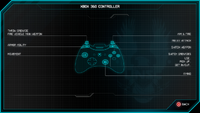 Xbox 360

| Button | Input action |
|---|---|
| Switch Grenade | |
| Action | |
| Switch Weapons | |
| Movement | |
| Look | |
| Fire Weapon | |
| Throw Grenade | |
| Melee | |
| Use Armor Ability | |
| Pause Menu |
Keyboard and mouse[edit]

Controls for PC keyboard and mouse.
| Key or mouse button | Input action | Bindable |
|---|---|---|
| Q | Activate Ability | Yes |
| Space | Melee Attack | |
| Left Shift | Switch Weapon | |
| Left Ctrl | Switch Grenade | |
| E | Interaction | |
| W | Move Up | |
| A | Move Left | |
| S | Move Down | |
| D | Move Right | |
| Escape | Pause Menu | No |
| Left Mouse Button | Fire Weapon | |
| Right Mouse Button | Throw Grenade |
Touch input[edit]
Touch controls for mobile devices (iOS and Windows Phone).
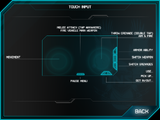 Halo: Spartan Assault controls on iOS.

| |||||||||||

