Gameplay

HSS:Control schemes

From Halopedia, the Halo wiki

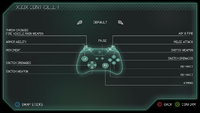
A screenshot of the selected “DEFAULT” and stick layout is set by default in the “CHANGE CONTROLS” (“SELECT INPUT METHOD”: Controller) setting menu of Halo: Spartan Strike (Windows) (Steam).
"BEAUTIFUL, AIN'T IT? SOMEONE SHOULD TAKE A PICTURE."
It has been requested that image(s) be uploaded and added to this page or section.
Remove this template once the image(s) have been uploaded and applied.

The following control schemes are available for Halo: Spartan Strike. For the control schemes of the prequel Halo: Spartan Assault, see here, which used the same engine.

Controller[edit]

Controls for the Xbox controller.

Stick Layout[edit]

Button Layout[edit]

Default[edit]

A screenshot of the selected “DEFAULT” and stick layout is set by default in the “CHANGE CONTROLS” (“SELECT INPUT METHOD”: Controller) setting menu of Halo: Spartan Strike (Windows) (Steam).
Button Input Action
Left Bumper
Armor Ability
Right Bumper
Melee Attack
Y
Switch Weapon
↑ D-Pad
↓ D-Pad
B
Switch Grenades
← D-Pad
→ D-Pad
A
Interaction
X
"Start" Button
Pause Menu
Right Trigger
Fire Weapon
Left Trigger
Throw Grenade

Southpaw[edit]

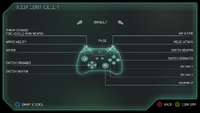
A screenshot of the selected “SOUTHPAW” and stick layout is set by default in the “CHANGE CONTROLS” (“SELECT INPUT METHOD”: Controller) setting menu of Halo: Spartan Strike (Windows) (Steam).
Button Input Action
Right Bumper
Armor Ability
Right Trigger
Melee Attack
Y
Switch Weapon
↑ D-Pad
↓ D-Pad
B
Switch Grenades
← D-Pad
→ D-Pad
A
Interaction
X
"Start" Button
Pause Menu
Left Trigger
Fire Weapon
Left Bumper
Throw Grenade

Boxer[edit]

A screenshot of the selected “BOXER” and stick layout is set by default in the “CHANGE CONTROLS” (“SELECT INPUT METHOD”: Controller) setting menu of Halo: Spartan Strike (Windows) (Steam).
Button Input Action
Left Bumper
Armor Ability
Left Trigger
Melee Attack
Y
Switch Weapon
↑ D-Pad
↓ D-Pad
B
Switch Grenades
← D-Pad
→ D-Pad
A
Interaction
X
"Start" Button
Pause Menu
Right Trigger
Fire Weapon
Right Bumper
Throw Grenade

Boxpaw[edit]

A screenshot of the selected “BOXPAW” and stick layout is set by default in the “CHANGE CONTROLS” (“SELECT INPUT METHOD”: Controller) setting menu of Halo: Spartan Strike (Windows) (Steam).
Button Input Action
Right Bumper
Armor Ability
Right Trigger
Melee Attack
Y
Switch Weapon
↑ D-Pad
↓ D-Pad
B
Switch Grenades
← D-Pad
→ D-Pad
A
Interaction
X
"Start" Button
Pause Menu
Left Trigger
Fire Weapon
Left Bumper
Throw Grenade

Recon[edit]

A screenshot of the selected “RECON” and stick layout is set by default in the “CHANGE CONTROLS” (“SELECT INPUT METHOD”: Controller) setting menu of Halo: Spartan Strike (Windows) (Steam).
Button Input Action
X
Armor Ability
Left Bumper
B
Melee Attack
Y
Switch Weapon
↑ D-Pad
↓ D-Pad
A
Switch Grenades
← D-Pad
→ D-Pad
Right Bumper
Interaction
"Start" Button
Pause Menu
Right Trigger
Fire Weapon
Left Trigger
Throw Grenade

Cluster[edit]

A screenshot of the selected “CLUSTER” and stick layout is set by default in the “CHANGE CONTROLS” (“SELECT INPUT METHOD”: Controller) setting menu of Halo: Spartan Strike (Windows) (Steam).
Button Input Action
Y
Armor Ability
B
Melee Attack
Right Bumper
Switch Weapon
↑ D-Pad
↓ D-Pad
Left Bumper
Switch Grenades
← D-Pad
→ D-Pad
A
Interaction
X
"Start" Button
Pause Menu
Right Trigger
Fire Weapon
Left Trigger
Throw Grenade

Keyboard and mouse[edit]

A screenshot of the “VIEW CONTROLS” (“SELECT INPUT METHOD”: Mouse and Keyboard) setting menu of Halo: Spartan Strike (Windows) (Steam).Every binding is set by default.

Controls for PC keyboard and mouse.

Key or Mouse Button Input Action Bindable
Q Activate Ability Yes
Space Melee Attack
1 Switch Weapon
2 Switch Grenades
E Interaction
W Move Up
A Move Left
S Move Down
D Move Right
Escape Pause Menu No
Left Mouse Button Fire Weapon
Right Mouse Button Throw Grenade

Touch input[edit]