
HW:Control schemes
From Halopedia, the Halo wiki

The following control schemes are available to use in Halo Wars for Xbox 360 and Halo Wars: Definitive Edition for Xbox One and PC.
Halo Wars (Xbox 360)[edit]
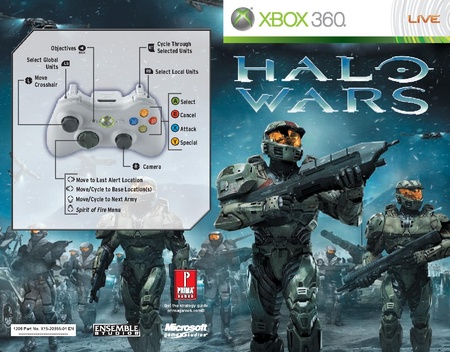
The Halo Wars control scheme in the Halo Wars manual.
Halo Wars had only one control scheme available for use with the Xbox 360 controller.
| Button | Input action |
|---|---|
| Press to select/Hold to select with "paintbrush" tool | |
| Cancel selection | |
| Move/Gather/Primary attack | |
| Special/Secondary attack | |
| Move crosshair | |
| Camera | |
| Cycle through selection | |
| Hold to speed up camera | |
| Objectives | |
| Pause | |
| Leader abilities menu | |
| Move/cycle to next army | |
| Move to last alert location | |
| Move/cycle to base locations | |
| Select local units | |
| Select global units |
Halo Wars: Definitive Edition[edit]
Default keyboard and mouse controls.

| Input action | Key or mouse button | Official description | |
|---|---|---|---|
| Hotkeys | Pause Game/Main Menu | F10 | Pauses the game and brings up the main menu. |
| Objectives | F9 | Opens the objectives menu. | |
| Global Units | E | Select all units, regardless of map location. | |
| Sub-select units | Mouse Wheel Down | Sub-select a group of units from all currently selected units. | |
| Local Units | Q | Select all units currently on screen. | |
| Game Cancel | Escape | Cancel action. | |
| Game Action Alternate | R | Use unit special ability or alternate action. | |
| Camera Panning Movement Left | A | Pan camera to the left. | |
| Camera Panning Movement Right | D | Pan camera to the right. | |
| Camera Panning Movement Up | W | Pan camera up. | |
| Camera Panning Movement Down | S | Pan camera down. | |
| Reset Camera | Home | Reset camera to original position. | |
| Set Rally Point | Y | Set a rally point that tells new units where to move to. | |
| Move to Last Alert Location | Space | Move camera to the last alert location. | |
| Move/Cycle to Base Location(s) | Z | Move the camera to the next base location. | |
| Move/Cycle to Next Army | X | Move the camera to the next army location. | |
| Spirit of Fire Menu | F | Open the Spirt of Fire Menu, where strong leader powers and abilities can be found. | |
| Ping | G | Highlight a location on the map for allies to see. | |
| Bring up in-game chat/Send Message | Enter | Moves camera faster when held down. | |
| Rotate Camera | Alt + MouseMove Left or Right | Rotates camera. | |
| Rotate Camera Left Alternate | Insert | Rotates camera left. | |
| Rotate Camera Right Alternate | Delete | Rotate camera right. | |
| Camera Zoom | Alt + Scroll wheel | Zoom camera level. | |
| Camera Zoom In | Page Down | Zoom camera in. | |
| Camera Zoom Out | Page Up | Zoom camera out. | |
| Faster Camera Movement | Shift + Directional Key | Moves camera faster when held down. | |
| Rectangle Multi-Unit Selection | Left Click (Hold) | Click and Hold the Left Mouse button to create a starting point and drag the mouse in any direction to create a selection box over units you would like to select. | |
| Control Groups | Create Control Group | Ctrl + # | With a unit or a selection of units press CTRL + (0-9) to assign the selection to the selected number slot. |
| Add Units to Control Group | Shift + # | With a unit or multiple units selected press SHIFT + (0-9) to add units to desired control group. | |
| Select Control Group | 0-9 | Press (0-9) once to select desired control group. Double click to put camera focus onto the control group. | |
| Create Group Exclusive | Alt + # | With a unit or multiple units selected press ALT + (0-9). The selected units will make a new control group and are removed from other control groups. | |
| Add Additional Units Exclusive | Shift + Alt + # | With a unit or multiple units selected press ALT + SHIFT + (0-9). The selected units are added to the control group and are removed from other control groups. | |
| Radial Menu Hotkeys | Radial Menu Top Use | W | Activate the radial menu top action. |
| Radial Menu Top Cancel | Left Shift + W | Cancel the radial menu top action. | |
| Radial Menu Top-Right Use | E | Activate the radial menu top-right action. | |
| Radial Menu Top-Right Cancel | Left Shift + E | Cancel the radial menu top-right action. | |
| Radial Menu Right Use | D | Activate the radial menu right action. | |
| Radial Menu Right Cancel | Left Shift + D | Cancel the radial menu right action. | |
| Radial Menu Bottom-Right Use | C | Activate the radial menu bottom-right action. | |
| Radial Menu Bottom-Right Cancel | Left Shift + C | Cancel the radial menu bottom-right action. | |
| Radial Menu Bottom Use | X | Activate the radial menu bottom action. | |
| Radial Menu Bottom Cancel | Left Shift + X | Cancel the radial menu bottom action. | |
| Radial Menu Bottom-Left Use | Z | Activate the radial menu bottom-left action. | |
| Radial Menu Bottom-Left Cancel | Left Shift + Z | Cancel the radial menu bottom-left action. | |
| Radial Menu Left Use | A | Activate the radial menu left action. | |
| Radial Menu Left Cancel | Left Shift + A | Cancel the radial menu left action. | |
| Radial Menu Top-Left Use | Q | Activate the radial menu top-left action. | |
| Radial Menu Top-Left Cancel | Left Shift + Q | Cancel the radial menu top-left action. | |
| Alternate Hotkeys | Camera Panning Movement Left Alternate | Left Arrow | Pan camera to the left. |
| Camera Panning Movement Right Alternate | Right Arrow | Pan camera to the right. | |
| Camera Panning Movement Up Alternate | Up Arrow | Pan camera up. | |
| Camera Panning Movement Down Alternate | Down Arrow | Pan camera down. | |
Gallery[edit]
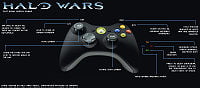 An older, post-alpha control scheme from Halo Wars' development.
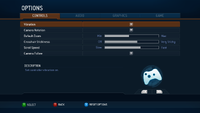 "CONTROLS" setting menu of Halo Wars (Xbox 360).


| |||||||||||

