 This article is a stub. You can help Halopedia by expanding it. Reason: About the ↑ D-Pad use for Teamspeak, I don't think it does; if someone who plays Halo 2 on the original Xbox with the fan-made server Insignia and a mic, please test it.
The following control schemes were available for the original release of Halo 2 for Xbox (including when played via Xbox 360 backward compatibility) and Halo 2 Vista.
Halo 2 (Xbox)[edit]
Thumbstick Layout[edit]
Button Layout[edit]
Default[edit]
| Button |
Input action
|
| Xbox |
Xbox 360
|
| A |
Jump
|
| B |
Melee Attack
|
| X |
Reload weapon/Swap weapon/Action
|
| Y |
Switch Weapons/Dual wield weapons
|
| Left Analog Click |
Hold crouch
|
| Right Analog Click |
Zoom
|
| Right Trigger |
Fire primary weapon
|
| Left Trigger |
Throw grenade/Fire secondary weapon/E-brake/Boost
|
| "Back" Button |
Go back/Multiplayer score
|
| "Start" Button |
Pause
|
| ↑ D-Pad |
Teamspeak
|
| ↓ D-Pad |
Alert carry
|
| Black Button |
Right Bumper |
Switch grenades
|
| White Button |
Left Bumper |
Flashlight/Invisibility/Teamspeak
|
Southpaw[edit]
| Button |
Input action
|
| Xbox |
Xbox 360
|
| A |
Jump
|
| B |
Melee Attack
|
| X |
Reload weapon/Swap weapon/Action
|
| Y |
Switch Weapons/Dual wield weapons
|
| Left Analog Click |
Hold crouch
|
| Right Analog Click |
Zoom
|
| Right Trigger |
Throw grenade/Fire secondary weapon/E-brake/Boost
|
| Left Trigger |
Fire primary weapon
|
| "Back" Button |
Go back/Multiplayer score
|
| "Start" Button |
Pause
|
| ↑ D-Pad |
Teamspeak
|
| ↓ D-Pad |
Alert carry
|
| Black Button |
Right Bumper |
Switch grenades
|
| White Button |
Left Bumper |
Flashlight/Invisibility/Teamspeak
|
| Button |
Input action
|
| Xbox |
Xbox 360
|
| A |
Jump
|
| B |
Throw grenade/Fire secondary weapon/E-brake/Boost
|
| X |
Reload weapon/Swap weapon/Action
|
| Y |
Switch Weapons/Dual wield weapons
|
| Left Analog Click |
Hold crouch
|
| Right Analog Click |
Zoom
|
| Right Trigger |
Fire primary weapon
|
| Left Trigger |
Melee Attack
|
| "Back" Button |
Go back/Multiplayer score
|
| "Start" Button |
Pause
|
| ↑ D-Pad |
Teamspeak
|
| ↓ D-Pad |
Alert carry
|
| Black Button |
Right Bumper |
Switch grenades
|
| White Button |
Left Bumper |
Flashlight/Invisibility/Teamspeak
|
Green Thumb[edit]
| Button |
Input action
|
| Xbox |
Xbox 360
|
| A |
Jump
|
| B |
Zoom
|
| X |
Reload weapon/Swap weapon/Action
|
| Y |
Switch Weapons/Dual wield weapons
|
| Left Analog Click |
Hold crouch
|
| Right Analog Click |
Melee Attack
|
| Right Trigger |
Fire primary weapon
|
| Left Trigger |
Throw grenade/Fire secondary weapon/E-brake/Boost
|
| "Back" Button |
Go back/Multiplayer score
|
| "Start" Button |
Pause
|
| ↑ D-Pad |
Teamspeak
|
| ↓ D-Pad |
Alert carry
|
| Black Button |
Right Bumper |
Switch grenades
|
| White Button |
Left Bumper |
Flashlight/Invisibility/Teamspeak
|
Other control settings[edit]
With the "Thumbstick Layout" and "Button Layout" settings mentioned above, here are the rest of the settings.
| Setting |
Options |
Official description
|
| Look Sensitivity |
1 (low) |
Choose the speed at which you look around. Faster is not always better.
|
| 2
|
| 3 (Default)
|
| 4
|
| 5 (High)
|
| 6
|
| 7 (Very high)
|
| 8
|
| 9
|
| 10 (Insane)
|
| Look Inversion |
Enabled |
If this is enabled, moving the Thumbstick up causes you to look down.
|
| Disabled |
Default
|
| Automatic Look Centering |
Enabled |
This causes your view to automatically re-center as you move forward.
|
| Disabled |
Default
|
| Controller Vibration |
Enabled |
Default |
If this is enabled, your controller will vibrate in response to game events.
|
| Disabled
|
Halo 2 (Windows Vista)[edit]
Gallery[edit]
Halo 2 (Xbox)[edit]
Halo 2 manual (Human version)'s control scheme information on the back page.
Halo 2 manual (Covenant version)'s control scheme information on the back page.
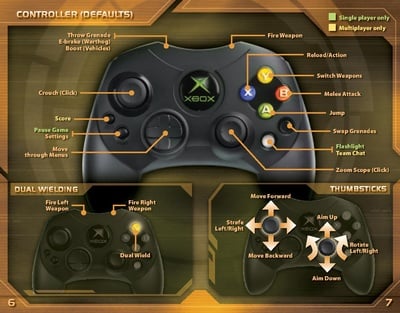
Halo 2 manual (Covenant version)'s control scheme information on pages 6 and 7.
Halo 2 (Windows Vista)[edit]
Halo 2 manual (PC version)'s keyboard and mouse control scheme information on the back page.
Halo 2 manual (PC version)'s controller control scheme information on pages 6 and 7.
Halo 2 manual (PC version)'s keyboard and mouse control scheme information on pages 8 and 9.

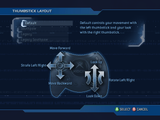 Default
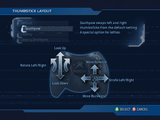 Southpaw
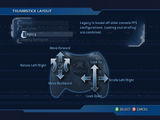 Legacy
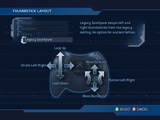 Legacy Southpaw


![A screenshot of the selected "Default" in the "Button Layout" settings menu of Halo 2 (Xbox).[1]Note: The screenshot was taken from the emulator Xemu.](/File:H2_%E2%80%94_ControllerLayoutDefault_Menu_Screenshot.png)
![A screenshot of the selected "Southpaw" in the "Button Layout" settings menu of Halo 2 (Xbox).[1]Note: The screenshot was taken from the emulator Xemu.](/File:H2_%E2%80%94_ControllerLayoutSouthpaw_Menu_Screenshot.png)
![A screenshot of the selected "Boxer" in the "Button Layout" settings menu of Halo 2 (Xbox).[1]Note: The screenshot was taken from the emulator Xemu.](/File:H2_%E2%80%94_ControllerLayoutBoxer_Menu_Screenshot.png)
![A screenshot of the selected "Green Thumb" in the "Button Layout" settings menu of Halo 2 (Xbox).[1]Note: The screenshot was taken from the emulator Xemu.](/File:H2_%E2%80%94_ControllerLayoutGreenThumb_Menu_Screenshot.png)


 This section is a stub. You can help Halopedia by expanding it.
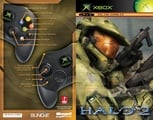 Halo 2 manual (Human version)'s control scheme information on the back page.
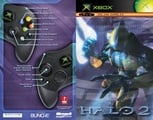 Halo 2 manual (Covenant version)'s control scheme information on the back page.
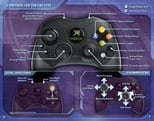 Halo 2 manual (Covenant version)'s control scheme information on pages 6 and 7.
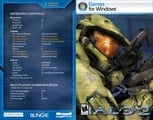 Halo 2 manual (PC version)'s keyboard and mouse control scheme information on the back page.
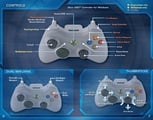 Halo 2 manual (PC version)'s controller control scheme information on pages 6 and 7.
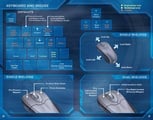 Halo 2 manual (PC version)'s keyboard and mouse control scheme information on pages 8 and 9.
